Mileage log for taxes · iPhone & Android
Your miles are worth thousands.
Log them for $6.99, once.
Odo is the IRS-ready mileage log without the $168-a-year subscription. Record trips in seconds, watch the deduction add up, export accountant-ready reports — all on your phone, all private.
Free for 20 trips a month, forever. One unlock for unlimited — that's the whole price.
Stop renting a notebook
for $168 a year.
A mileage log writes down where you drove and what it's worth. That is not a service. It does not need a server, an account, or a monthly bill. The subscription trackers now charge $13.99 a month for it — Odo charges $6.99, once, and the free tier (20 trips a month, every feature) never expires.
- No subscription
- No account
- No ads
- No servers
- No tracking you back
Three years of mileage logging
- MileIQ Unlimited, $13.99 × 36 months
- $504
- Odo Unlimited, once
- $6.99
That difference is a car payment. Or, at the 2026 IRS rate, the deduction on ~686 miles you didn't have to drive.
See the full MileIQ comparison →What are your miles worth?
Every business mile is a 72.5¢ deduction in 2026. Most people underestimate what a year of driving adds up to.
13,000 miles a year × $0.725 — the 2026 IRS standard mileage rate. A deduction reduces your taxable income; the cash you keep depends on your tax bracket.
Your yearly deduction
Miles worth 56× what a subscription tracker charges yearly. Odo logs them for $6.99, once.
Three ways to log a trip.
All of them take seconds.
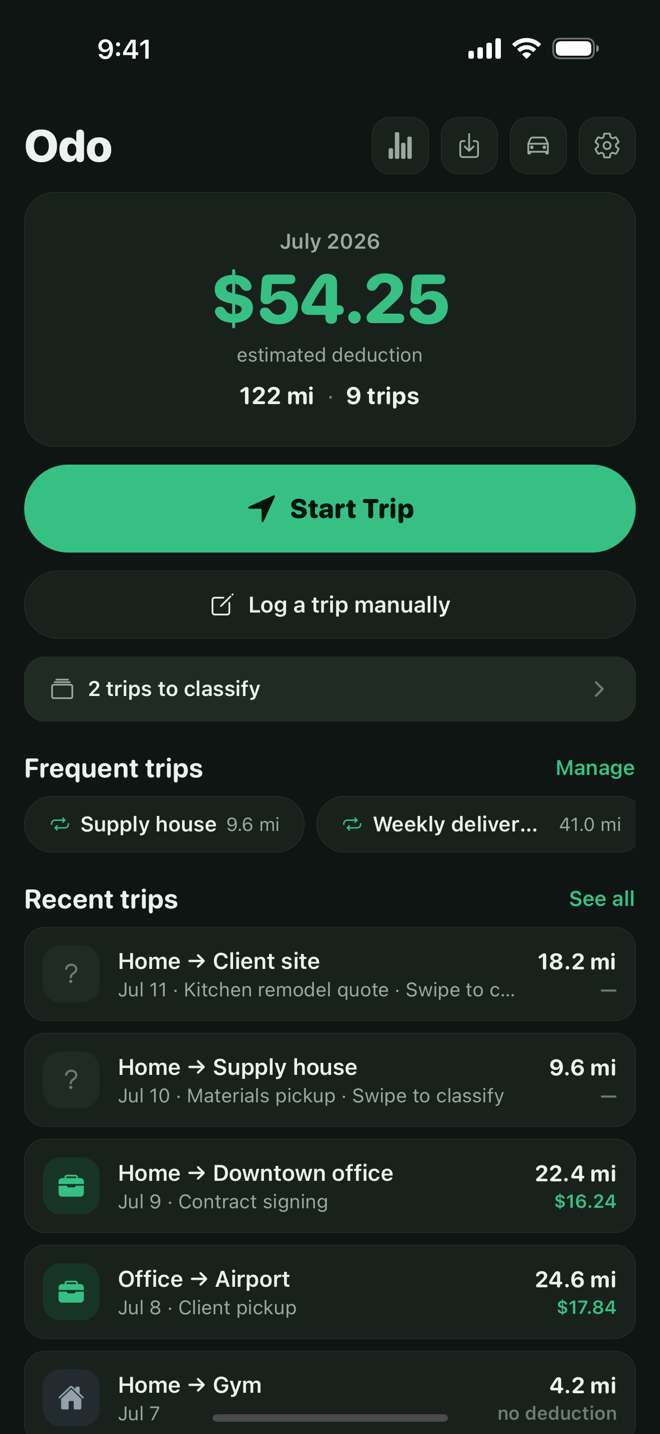
Tap Start, drive, tap Stop
One-tap GPS recording that keeps measuring while you navigate in your maps app — and stops the moment you tap Stop, so it never drains your battery from your pocket.
Type it in ten seconds
Forgot to record? Date, from, to, purpose, miles. Or save a frequent route once and re-log it in two taps.
Enter an odometer pair
Start reading, end reading — Odo does the math. The way logbooks worked before apps, minus the arithmetic.
Built for the moment your accountant asks for the log
Swipe to classify
Right for Business, left for Personal — Medical and Charity are a tap away. Unclassified trips queue up on the home screen so nothing slips through.
IRS rates built in
An effective-dated rate table values every trip at the rate in force on its date — including mid-year changes. Custom rate override for reimbursements or other countries.
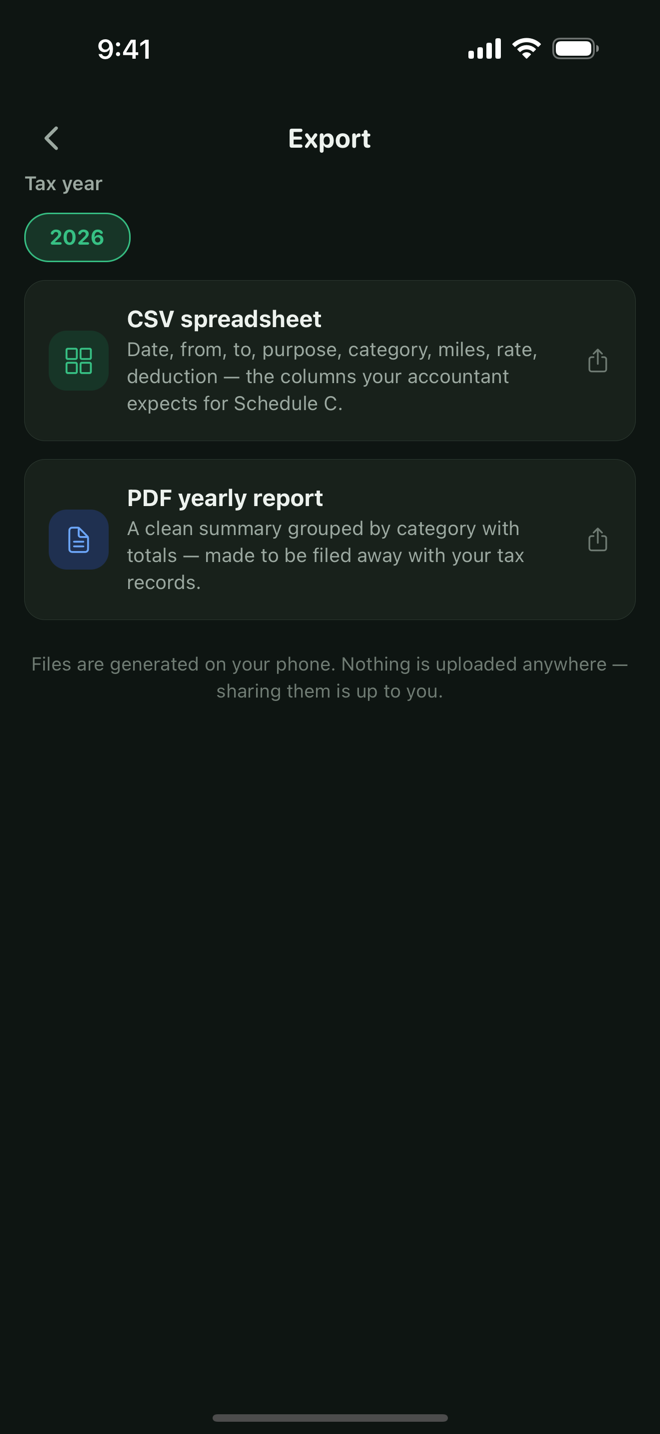
Accountant-ready exports
CSV with the exact columns a Schedule C preparer expects — date, from, to, purpose, category, miles, rate, deduction — plus a clean PDF yearly report. Generated entirely on your phone.
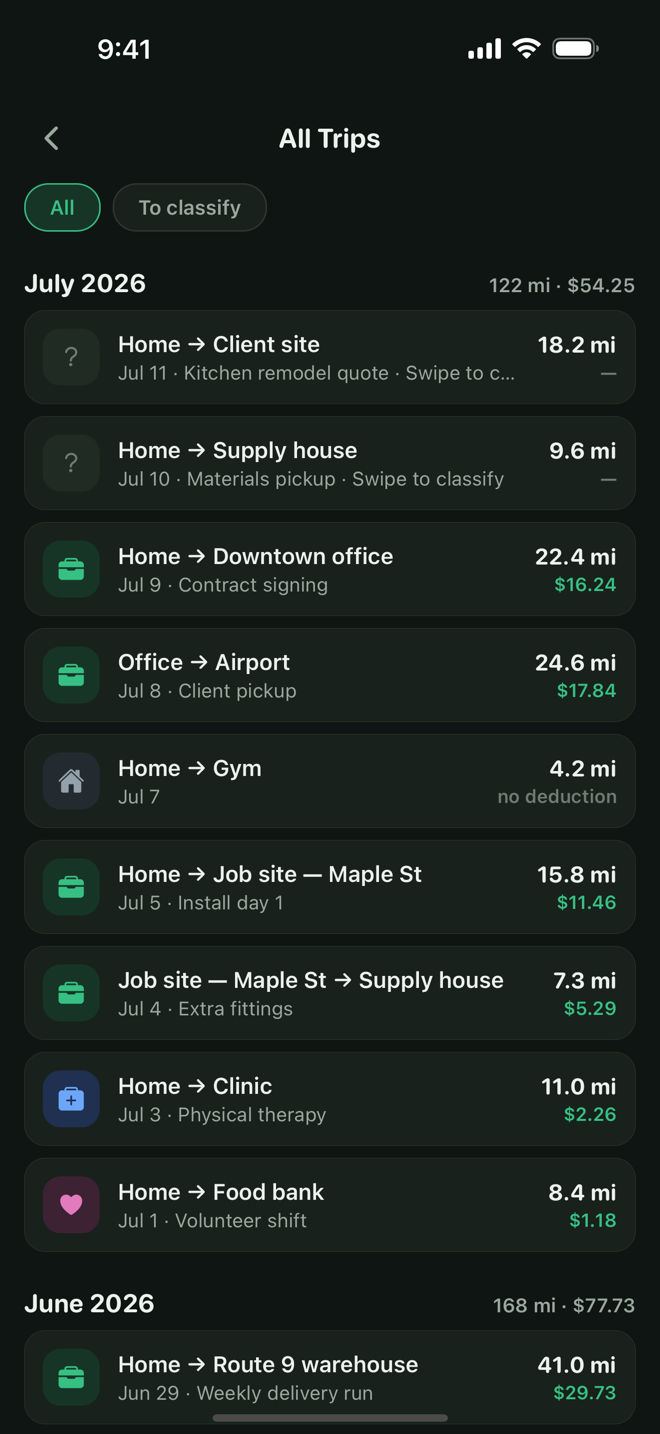
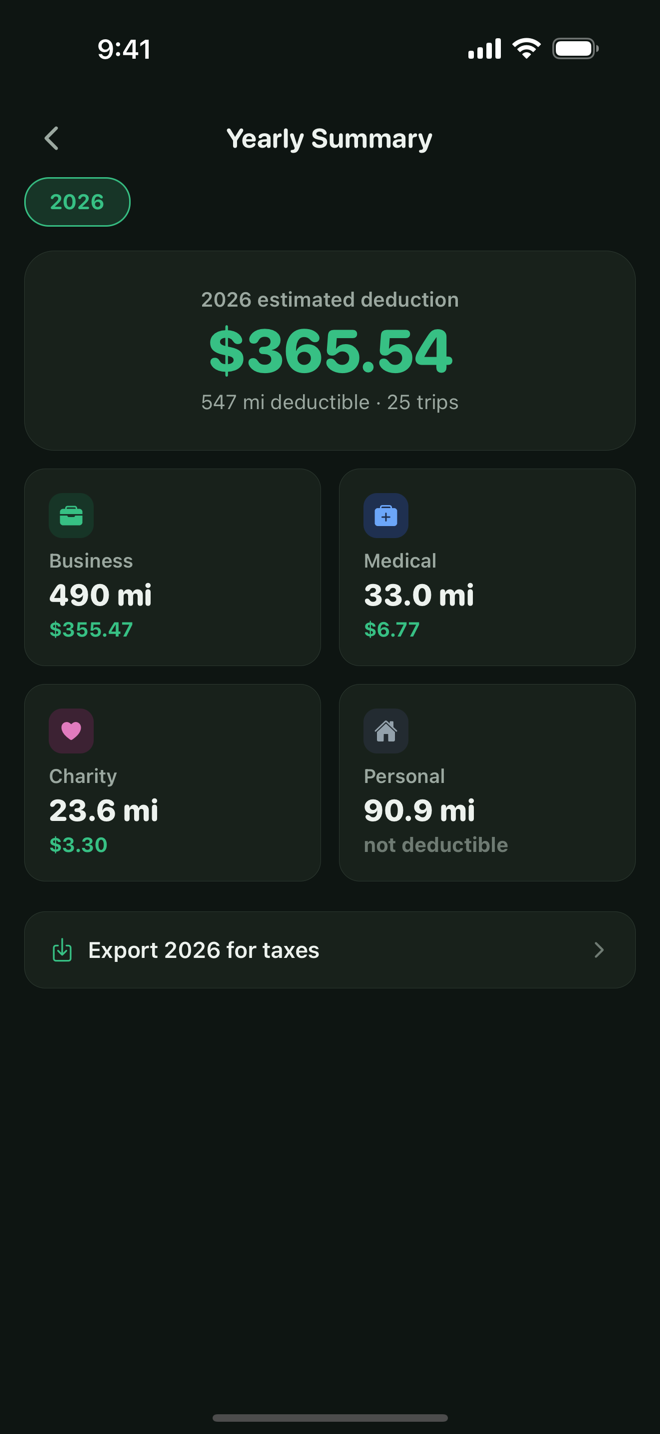
Every vehicle, every year
Per-month history, yearly per-category dashboards, and multiple vehicles with Odo Unlimited.
Privacy, verifiable
A location app that can't phone home
Your driving history says where you live, work, worship, and sleep. Odo has no account, no servers, and no analytics SDKs — your location data never leaves your phone. Not “we don't sell it.” It never leaves. The only thing the app sends is an anonymous crash report when something breaks, and no trip or location data goes in it.
- Trip or location data sent to us
- None
- Analytics & tracking SDKs
- 0
- Accounts, servers, ads
- None
- Location use
- Only while recording
Fair questions
- Is it really $6.99, once?
- Yes. Odo is free to download and every feature works from day one — GPS recording, IRS rates, swipe to classify, all of it — for up to 20 trips a month, forever. One $6.99 purchase lifts the cap and unlocks exports, multiple vehicles, and frequent trips. Permanently. There is no subscription and nothing else to buy, and your trip history is never locked behind anything.
- Will the IRS accept a log from Odo?
- Odo records exactly what the IRS asks for in a mileage log: the date, destination, business purpose, and miles for each trip, valued at the standard mileage rate in effect on the trip date. The CSV export has the columns a Schedule C preparer expects. What matters most is that you log trips at or near the time you take them — which is exactly what a tracker that takes ten seconds per trip is for.
- Why no automatic drive detection?
- On purpose. Always-on background tracking is why other mileage apps drain batteries, miss or duplicate drives, and need your location 24/7. Odo uses location only between Start and Stop of a recording (switch to your maps app freely in between), and manual logging takes seconds. You trade a little automation for reliability, battery life, and total privacy — the same trade a paper logbook makes, minus the paper.
- Where does my location data go?
- Nowhere. Location is used on your phone to measure a recording and never stored or sent. Trips live in a database on your phone, backed up to your own iCloud Drive — no account, no Odo servers, no analytics. The only thing Odo ever sends is an anonymous crash report when something breaks, so we can fix it; it contains a stack trace and your device model, never your location, trips, or anything you typed.
- What if I delete the app or get a new phone?
- Your log comes back. On iPhone, Odo keeps an automatic backup in your own iCloud Drive (you can switch it off), and a fresh install offers to restore it. We never see that file. You can also save a backup file by hand and restore it anywhere.
- What about rate changes each tax year?
- IRS rates ship inside the app as an effective-dated table (70¢/mile for 2025, 72.5¢ for 2026), so each trip is valued at the rate in effect on its date. New year, small app update. You can also set a custom rate — useful for employer reimbursements or outside the U.S.
- Is there an Android version?
- Yes. Odo is on Google Play as well as the App Store, with the same one-time unlock.
This year's miles are already worth money.
Start logging them today — free for 20 trips a month. Unlock once, own it forever.